

Hab LG 65UJ6309, geht er?
Ich habe WS2801 vor 4-5 Jahren verbaut, hab keinen Vergleich, war aber zufrieden.

Hab LG 65UJ6309, geht er?
Ich habe WS2801 vor 4-5 Jahren verbaut, hab keinen Vergleich, war aber zufrieden.
Ob der TV mit der Standard Methode zu rooten ist kannst du nur ausprobieren.
Wenn ein aktuelles webOS drauf ist könnte das gesperrt sein, dann muss man die Crashed Exploit Methode verwenden.
gruß pclin
O Mann, alles spanisch für mich.
Versuche https://rootmy.tv/ wenn das nicht geht bekommst du die Infos für die Crashed Exploit Methode.
Auf Discord openLGTV gibt es viele Informationen und dort sind auch die Devs.
Besonders schwierig ist das alles nicht...
gruß pclin
Rootmy.tv hat geklappt, PicCap installiert.
Weiter? 😬
Hyperion auf LG installieren.
ESP mit WLED flashen.
ESP, LED, Netzteil anschliessen.
WLED und Hyperion konfigurieren.
LG:
Quickstart+ (falls vorhanden) ausschalten.
LAN verwenden.
Kein webOS update machen!
gruß pclin
Wo finde ich die Erklärung "ESP mit WLED flashen"?
Und "WLED mit Hyperion konfigurieren"?
LAN geht bei mir nicht, nur WLan da der Fernseher im Dachgeschoss ist.
Quickstart+ muss ich schauen was es überhaupt ist.
Hay pclin, sorry, aber weiß echt nicht wie weiter. Es gibt einfach zu viele Variationen.
Verstehe nicht, brauche ich jetzt echt noch Sicherung und Kondensator um LEDs anschliessen zu können?
Also, ESP32 ist da. Wie jetzt weiter? (Gibt es echt nirgendwo ein Step by Step Tutorial?)
Thx.
Post #490 dort findest du alle Infos.
Levelshifter, Wiederstand, Kondensator und Sicherungen sind Optional.
Es kommt immer darauf an welche LED wie lang sind die Kabel, möchtest du Sicherheit (Sicherungen) usw.
Deshalb ist ein Step by Step Tutorial nicht für jeden passend.
gruß pclin
ps.
Hier im Thread geht es um digitale Grabber!
Wie finde ich Post #490???
Ok, wenn optional das ist eine Antwort, thx.
Also, im konkreten Fall ESP32 mit WS2801, weißt du wie und was?
Das hier ist jetzt #494.
Steht immer oben rechts im Post.
gruß pclin
Wird nicht angezeigt. 🤷🏻♂️
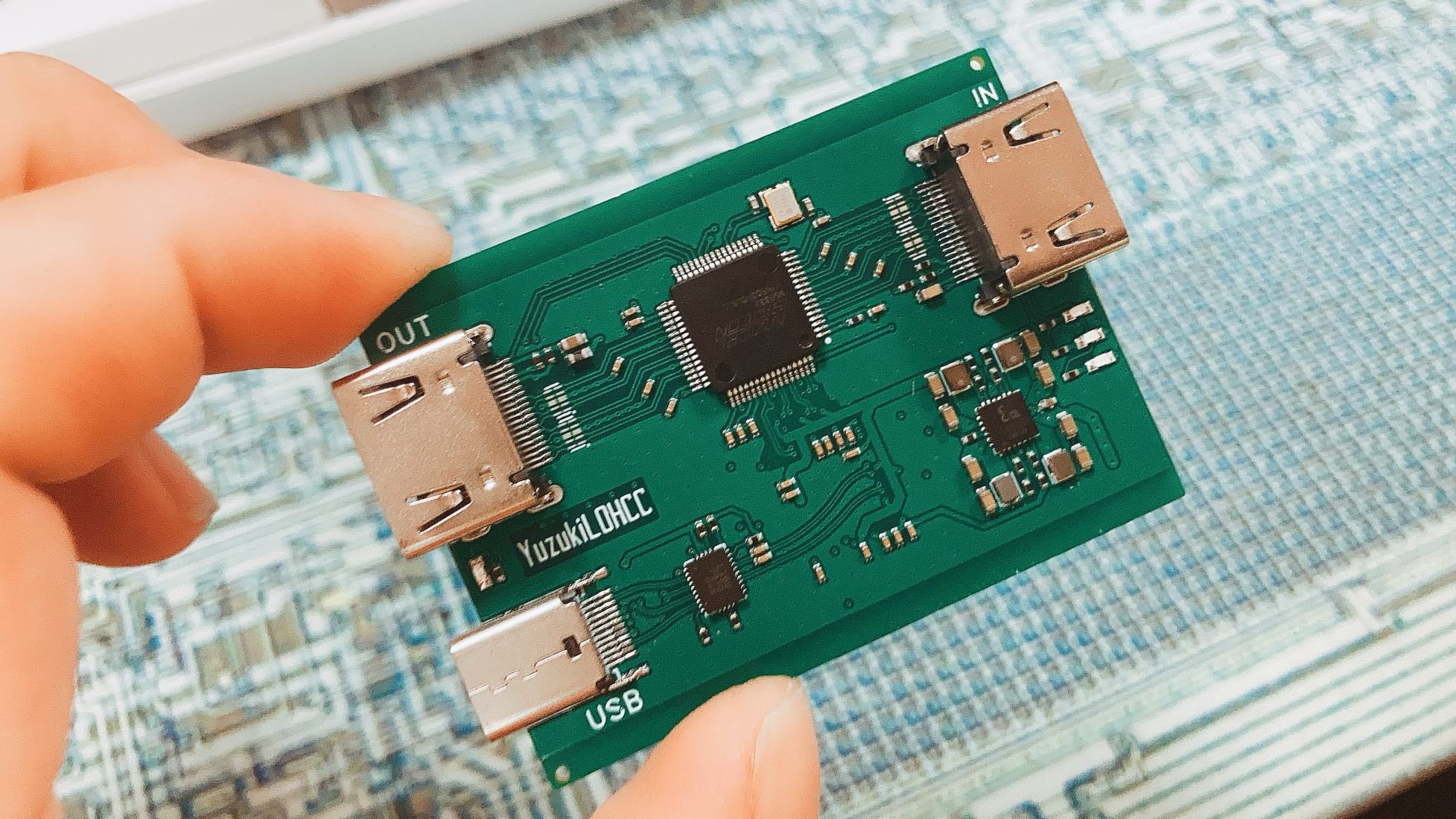
Neuer Grabber mit Macrosilicon Chip ProdID=2130 Rev=31.00
4K 30 Hz Eingang, Ausgang USB 3.0
T: Bus=02 Lev=01 Prnt=01 Port=00 Cnt=01 Dev#= 2 Spd=5000 MxCh= 0
D: Ver= 3.20 Cls=ef(misc ) Sub=02 Prot=01 MxPS= 9 #Cfgs= 1
P: Vendor=345f ProdID=2130 Rev=31.00
S: Manufacturer=MACROSILICON
S: Product=USB3.0 UHD
S: SerialNumber=20210623
C: #Ifs= 5 Cfg#= 1 Atr=80 MxPwr=512mA
I: If#= 0 Alt= 0 #EPs= 0 Cls=0e(video) Sub=01 Prot=00 Driver=uvcvideo
I: If#= 1 Alt= 0 #EPs= 1 Cls=0e(video) Sub=02 Prot=00 Driver=uvcvideo
I: If#= 2 Alt= 0 #EPs= 0 Cls=01(audio) Sub=01 Prot=00 Driver=(none)
I: If#= 3 Alt= 0 #EPs= 0 Cls=01(audio) Sub=02 Prot=00 Driver=(none)
I: If#= 4 Alt= 0 #EPs= 1 Cls=03(HID ) Sub=00 Prot=00 Driver=usbhid
ioctl: VIDIOC_ENUM_FMT
Index : 0
Type : Video Capture
Pixel Format: 'YUYV'
Name : YUV 4:2:2 (YUYV)
Size: Discrete 1920x1080
Interval: Discrete 0.017s (60.000 fps)
Interval: Discrete 0.020s (50.000 fps)
Interval: Discrete 0.033s (30.000 fps)
Interval: Discrete 0.050s (20.000 fps)
Interval: Discrete 0.100s (10.000 fps)
Size: Discrete 1600x1200
Interval: Discrete 0.017s (60.000 fps)
Interval: Discrete 0.020s (50.000 fps)
Interval: Discrete 0.033s (30.000 fps)
Interval: Discrete 0.050s (20.000 fps)
Interval: Discrete 0.100s (10.000 fps)
Size: Discrete 1360x768
Interval: Discrete 0.017s (60.000 fps)
Interval: Discrete 0.020s (50.000 fps)
Interval: Discrete 0.033s (30.000 fps)
Interval: Discrete 0.050s (20.000 fps)
Interval: Discrete 0.100s (10.000 fps)
Size: Discrete 1280x1024
Interval: Discrete 0.017s (60.000 fps)
Interval: Discrete 0.020s (50.000 fps)
Interval: Discrete 0.033s (30.000 fps)
Interval: Discrete 0.050s (20.000 fps)
Interval: Discrete 0.100s (10.000 fps)
Size: Discrete 1280x960
Interval: Discrete 0.017s (60.000 fps)
Interval: Discrete 0.020s (50.000 fps)
Interval: Discrete 0.033s (30.000 fps)
Interval: Discrete 0.050s (20.000 fps)
Interval: Discrete 0.100s (10.000 fps)
Size: Discrete 1280x720
Interval: Discrete 0.017s (60.000 fps)
Interval: Discrete 0.020s (50.000 fps)
Interval: Discrete 0.033s (30.000 fps)
Interval: Discrete 0.050s (20.000 fps)
Interval: Discrete 0.100s (10.000 fps)
Size: Discrete 1024x768
Interval: Discrete 0.017s (60.000 fps)
Interval: Discrete 0.020s (50.000 fps)
Interval: Discrete 0.033s (30.000 fps)
Interval: Discrete 0.050s (20.000 fps)
Interval: Discrete 0.100s (10.000 fps)
Size: Discrete 800x600
Interval: Discrete 0.017s (60.000 fps)
Interval: Discrete 0.020s (50.000 fps)
Interval: Discrete 0.033s (30.000 fps)
Interval: Discrete 0.050s (20.000 fps)
Interval: Discrete 0.100s (10.000 fps)
Size: Discrete 720x576
Interval: Discrete 0.017s (60.000 fps)
Interval: Discrete 0.020s (50.000 fps)
Interval: Discrete 0.033s (30.000 fps)
Interval: Discrete 0.050s (20.000 fps)
Interval: Discrete 0.100s (10.000 fps)
Size: Discrete 720x480
Interval: Discrete 0.017s (60.000 fps)
Interval: Discrete 0.020s (50.000 fps)
Interval: Discrete 0.033s (30.000 fps)
Interval: Discrete 0.050s (20.000 fps)
Interval: Discrete 0.100s (10.000 fps)
Size: Discrete 640x480
Interval: Discrete 0.017s (60.000 fps)
Interval: Discrete 0.020s (50.000 fps)
Interval: Discrete 0.033s (30.000 fps)
Interval: Discrete 0.050s (20.000 fps)
Interval: Discrete 0.100s (10.000 fps)
ioctl: VIDIOC_ENUM_FMT
Index : 0
Type : Video Capture
Pixel Format: 'MJPG' (compressed)
Name : MJPEG
Size: Discrete 1920x1080
Interval: Discrete 0.020s (50.000 fps)
Interval: Discrete 0.033s (30.000 fps)
Interval: Discrete 0.040s (25.000 fps)
Interval: Discrete 0.050s (20.000 fps)
Interval: Discrete 0.100s (10.000 fps)
Size: Discrete 1600x1200
Interval: Discrete 0.020s (50.000 fps)
Interval: Discrete 0.033s (30.000 fps)
Interval: Discrete 0.040s (25.000 fps)
Interval: Discrete 0.050s (20.000 fps)
Interval: Discrete 0.100s (10.000 fps)
Size: Discrete 1360x768
Interval: Discrete 0.017s (60.000 fps)
Interval: Discrete 0.020s (50.000 fps)
Interval: Discrete 0.033s (30.000 fps)
Interval: Discrete 0.050s (20.000 fps)
Interval: Discrete 0.100s (10.000 fps)
Size: Discrete 1280x1024
Interval: Discrete 0.017s (60.000 fps)
Interval: Discrete 0.020s (50.000 fps)
Interval: Discrete 0.033s (30.000 fps)
Interval: Discrete 0.050s (20.000 fps)
Interval: Discrete 0.100s (10.000 fps)
Size: Discrete 1280x960
Interval: Discrete 0.017s (60.000 fps)
Interval: Discrete 0.020s (50.000 fps)
Interval: Discrete 0.033s (30.000 fps)
Interval: Discrete 0.050s (20.000 fps)
Interval: Discrete 0.100s (10.000 fps)
Size: Discrete 1280x720
Interval: Discrete 0.017s (60.000 fps)
Interval: Discrete 0.020s (50.000 fps)
Interval: Discrete 0.033s (30.000 fps)
Interval: Discrete 0.050s (20.000 fps)
Interval: Discrete 0.100s (10.000 fps)
Size: Discrete 1024x768
Interval: Discrete 0.017s (60.000 fps)
Interval: Discrete 0.020s (50.000 fps)
Interval: Discrete 0.033s (30.000 fps)
Interval: Discrete 0.050s (20.000 fps)
Interval: Discrete 0.100s (10.000 fps)
Size: Discrete 800x600
Interval: Discrete 0.017s (60.000 fps)
Interval: Discrete 0.020s (50.000 fps)
Interval: Discrete 0.033s (30.000 fps)
Interval: Discrete 0.050s (20.000 fps)
Interval: Discrete 0.100s (10.000 fps)
Size: Discrete 720x576
Interval: Discrete 0.017s (60.000 fps)
Interval: Discrete 0.020s (50.000 fps)
Interval: Discrete 0.033s (30.000 fps)
Interval: Discrete 0.050s (20.000 fps)
Interval: Discrete 0.100s (10.000 fps)
Size: Discrete 720x480
Interval: Discrete 0.017s (60.000 fps)
Interval: Discrete 0.020s (50.000 fps)
Interval: Discrete 0.033s (30.000 fps)
Interval: Discrete 0.050s (20.000 fps)
Interval: Discrete 0.100s (10.000 fps)
Size: Discrete 640x480
Interval: Discrete 0.017s (60.000 fps)
Interval: Discrete 0.020s (50.000 fps)
Interval: Discrete 0.033s (30.000 fps)
Interval: Discrete 0.050s (20.000 fps)
Interval: Discrete 0.100s (10.000 fps)
Driver Info (not using libv4l2):
Driver name : uvcvideo
Card type : USB3.0 UHD
Bus info : usb-f0480500.ehci_v2-1
Driver version: 3.14.28
Capabilities : 0x84000001
Video Capture
Streaming
Device Capabilities
Device Caps : 0x04000001
Video Capture
Streaming
Priority: 2
Video input : 0 (Camera 1: ok)
Format Video Capture:
Width/Height : 1920/1080
Pixel Format : 'MJPG'
Field : None
Bytes per Line: 0
Size Image : 4147200
Colorspace : SRGB
Crop Capability Video Capture:
Bounds : Left 0, Top 0, Width 1920, Height 1080
Default : Left 0, Top 0, Width 1920, Height 1080
Pixel Aspect: 1/1
Streaming Parameters Video Capture:
Capabilities : timeperframe
Frames per second: 30.000 (30/1)
Read buffers : 0
brightness (int) : min=0 max=100 step=1 default=50 value=50
contrast (int) : min=0 max=100 step=1 default=50 value=50
saturation (int) : min=0 max=100 step=1 default=50 value=50
hue (int) : min=0 max=100 step=1 default=50 value=50
brightness (int) : min=0 max=100 step=1 default=50 value=50
contrast (int) : min=0 max=100 step=1 default=50 value=50
saturation (int) : min=0 max=100 step=1 default=50 value=50
hue (int) : min=0 max=100 step=1 default=50 value=50
Bis jetzt kann man sagen macht was er soll.
gruß pclin
Hay pclin,
also, WLED irgendwie installiert mithilfe von You Tube Video. Jetzt soll/muss ich am Fernseher einiges einstellen, da komme ich nicht weiter.
Ich habe keine Magic Remote Fernbedienung. Deswegen, oder wie kann ich die Einstellungen in der PicCap App vornehmen?
Und allgemein, PicCap installiert, Hyperion installiert, HyperHDR installiert.
ESP32 mit WLED geflasht.
Wie konfiguriert man jetzt alles zusammen?
Thx.
Hallo,
ich habe Hyperion.ng auf einem Pi4 am laufen. Dort ist dieser Grabber angeschlossen:

Nun wollte ich einen HDMI Switch anschließen. Dazu habe ich diesen gekauft:

An Input 1 hängt ein Apple TV. An Input 2 eine Playstation 4.
Wenn ich die Playstation anschalte, und der Input auf 2 steht, erscheint das Bild der Playstation. Wenn ich dann auf Input 1 Wechsel, erscheint das Bild vom AppleTV. Wenn ich wieder zurück schalte auf die PS4, bleibt das Bild schwarz.
Wenn ich dann das PS4 Kabel rausziehe aus dem Input und wieder einstecke, erscheint das Bild.
Kann mir jemand sagen, woran das liegen kann? Ohne Grabber funktioniert das Switchen ohne Probleme....
Da hat der Switch ein Problem mit der EDID Kommunikation (HDMI Handshake)
Weiterhin unterstützt der 'nur' 4K 30 Hz HDMI 1,4 b, HDCP 1.0/1,1 standards, was für AppleTV und PS4 eher suboptimal ist.
gruß pclin

Da hat der Switch ein Problem mit der EDID Kommunikation (HDMI Handshake)
Weiterhin unterstützt der 'nur' 4K 30 Hz HDMI 1,4 b, HDCP 1.0/1,1 standards, was für AppleTV und PS4 eher suboptimal ist.
gruß pclin
Danke für deine Erklärung! Kenne mich leider nicht mit Formaten/Herz etc nicht aus. Kannst du einen günstigen Switch empfehlen? So 3 Ports sollte er mind. haben und 4K unterstützen (bisschen Zukunft sicher). Habe aktuell noch einen FullHD Fernseher
Dieser switch funktioniert nun perfekt. Danke für den Hinweis, dass es am switch liegt 
Amazon:
CSL - HDMI 2.0 Verteiler 4k 60Hz - 5 Port Switch mit Fernbedienung - 2.0b Ultra HD 4096x2160 3840x2160 - HDR - 3D Ready - HDCP - 48 Bit Deep Color - automatische Umschaltung - Alu Schwarz
Sie haben noch kein Benutzerkonto auf unserer Seite? Registrieren Sie sich kostenlos und nehmen Sie an unserer Community teil!
