

Really nice.
Any chance for Pi sdcard images ?
I'd like to try the new algorithms.
Thanks
SDR & HDR 1080p/4k capable setup with Hyperion-NG for Media Center
- Awawa
- Erledigt
-
-
-
-
@NeeeeB it's already uploaded. untested

Great !! You rock ! will try this week-end as I'll have some free time.
In the mean time, I know I'm asking a lot, but would you have an idea on how to detect "properly" when there is no signal for the USB grabber and turn it off ?
Signal detection as it is now is not ideal at all in my opinion.
I have one of these grabbers that display a "rainbow" picture when there is no signal, so I've set signal detection to recognize the black bar on the right, but now every time I watch a movie or TV and the picture is very dark for more than 4 seconds on the right, Leds shut off...
They come back to life as soon as the dark is left, but it is really annoying.
I've tried to make it detect the blue bar with no luck... -
That's the limitation of the signal detection algorithm that depends on the brightness/black level. And it works as it's designed, causes some side effects.
In this situation some kind of image (rainbow) recognition is needed, and as it various from one kind of grabber to other (and from one saturation/luminescence levels to others), maybe detection by neural network would be preferred. Out of my skills unfortunately -
That's the limitation of the signal detection algorithm that depends on the brightness/black level. And it works as it's designed, causes some side effects.
In this situation some kind of image (rainbow) recognition is needed, and as I it various from one kind of grabber to other (and from one saturation/luminescence levels to other), maybe detection by neural network would be preferred. Out of my skills unfortunately
Ok, I can understand, many thanks BTWEDIT: one idea on the top of my head, what about fetching 3 points on the screen, located where green, red, blue bars are supposed to be when there is no signal, and check if their "dominant" color is green red and blue (no brightness or luminance needed, just check the dominant color) ?
It could work for the "rainbow" case, and I believe a lot of grabbers are displaying this picture. -
It seems like a kind of simply image recognition
Anyway, I don't gave a plan for any support for an analog solutions in a future and that "no signal" screen is a sign of that past technology. Modern HDMI grabbers simply output a black image.. there are cheap, more advanced (FullHD resolutions without downscaling, accept various FPS and color formats including HDR10) and reliable than counterfeit UTV0007 clones. This fork is focused on high quality image processing including HDR. I hope you understand my reasons. -
It seems like a kind of simply image recognition
Anyway, I don't gave a plan for any support for an analog solutions in a future and that "no signal" screen is a sign of that past technology. Modern HDMI grabbers simply output a black image.. there are cheap, more advanced (FullHD resolutions without downscaling, accept various FPS and color formats including HDR10) and reliable than counterfeit UTV0007 clones. This fork is focused on high quality image processing including HDR. I hope you understand my reasons.
I sure understand, no problem.
Would you have any link for one of these cheap and modern HDMI grabber ?
Because I've tried with both these grabbers :
https://fr.aliexpress.com/item…042311.0.0.4c966c37PQxp6l
https://fr.aliexpress.com/item…042311.0.0.27426c37YELEz2And they both give me that "rainbow" no signal...
Thx.
-
Seems it should be supported, but please continue on PM
I will try to help. First install latest of my release (SD card image) and send me output of dmesg, v4l2-ctl --all, v4l2-ctl --list-formats-ext, v4l2-ctl --list-devices commands after you ssh to the HyperHDR raspberry pi unit. It could be insufficient power supply for Rpi but it's wild guess. -
-
You can use it without 4k or HDR input signal. Simply turn off HDR to SDR tone mapping in the grabber configuration as probably you wont need it.
There some significant changes mainly in v4l2 grabber (grabber's process capture optimization, support for multi-threading instead single thread in Hyperion.NG, YUV/HDR tone mapping), color transformation (color calibration, extended image to LED color transformation) and it's targeted for newer Debian Buster so you can test it how it works for you.And support for USB grabbers in Windows is coming

-
You can use it without 4k or HDR input signal. Simply turn off HDR to SDR tone mapping in the grabber configuration as probably you wont need it.
There some significant changes mainly in v4l2 grabber (grabber's process capture optimization, support for multi-threading instead single thread in Hyperion.NG, YUV/HDR tone mapping), color transformation (color calibration, extended image to LED color transformation) and it's targeted for newer Debian Buster so you can test it how it works for you.And support for USB grabbers in Windows is coming
Great! I'll try it out soon! Thank you, my friend! -
@Awawa , hi! Installed your image. Everything is fine, but now running hyperion-remote commands via apple shortcuts doesn't work. Maybe the problem is that the controller is not identified as a raspberry pi? If I change the memory card to the one on which the original alpha 8 Hyperion-remote commands work again.
-
Also just switched to this fork after receiving a working USB 3.0 4k 4:4:4 grabber, because I would like to use the HDR-SDR tone-mapping. Speed improvements and more settings are of course also more than welcome. Great work!
I do notice though that (also because I can't set any decimation, so it's always off) the preview in Hyperion is not smooth (full 60fps).
Still need to test response time of LEDs a bit better, but it is expected that this preview is not smooth? I can see the LEDS are sometimes a fraction behind but might be a different issue.- Edit: nevermind, LEDs are now supersmooth and unrelated to grabber. Been tweaking too much :pCode[hyperiond V4L2:/DEV/VIDEO0] (DEBUG) (V4L2Grabber.cpp:1027:process_image()) Video FPS: 59.97, av. delay: 6ms, good: 3598, bad: 0 (60.00,15)Also, is there a way to turn on/off HDR-SDR tone-mapping via (JSON) API? I want to see if I can toggle this automatically based on the content I am watching.
-
@sergoo_lbt I will look into it
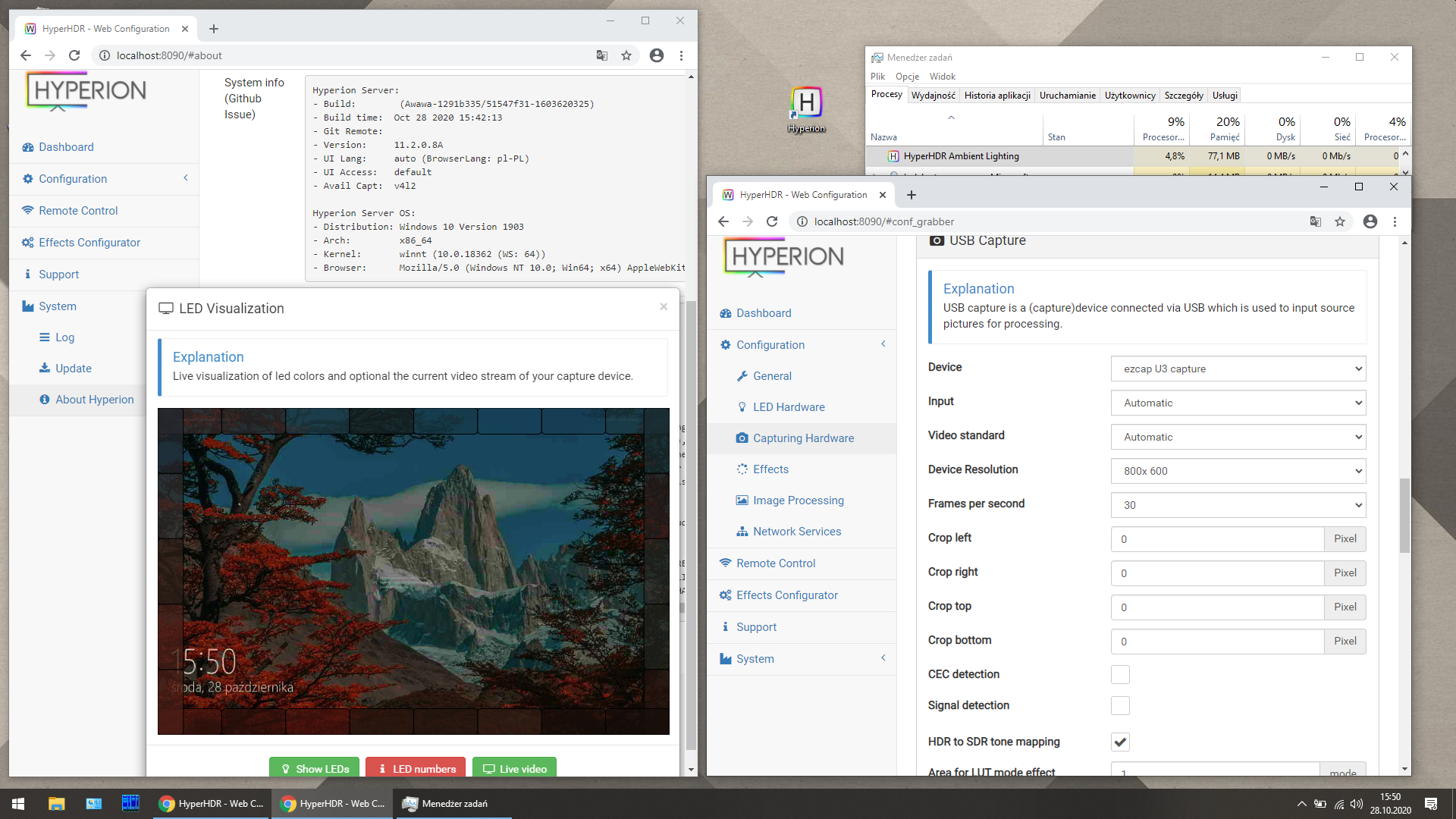
@Puck this feature is coming in the next versionBTW...this how it works under Windows for the first time with USB grabbers :geek: Need brave testers
-
Hey Awawa,
I'm trying to install on windows 10 using the HyperHDR-11.2.0.8A-Windows-AMD64-SUPPORT-FOR-USB-CAPTURE-DEVICE.exe download from the releases page. I get the following error on launch:
The code execution cannot proceed because turbojpeg.dll was not found. Reinstalling the program may fix the problem.Any ideas? I installed from the non usb capture file and it works fine, but its usb capture I'm after
Thanks!
https://github.com/awawa-dev/H…OR-USB-CAPTURE-DEVICE.exe
@sergoo_lbt I will look into it
@Puck this feature is coming in the next versionBTW...this how it works under Windows for the first time with USB grabbers :geek: Need brave testers
-
Yep, some downsides of the first release
Please install official libturbo for now https://sourceforge.net/projec…rbo-2.0.5-vc.exe/download and see if it helps.
If not copy dll from their installation forlder (turbojpeg.dll is there) to HyperHDR installation bin folder (where hyperiond.exe is).
I will include them in the next roll out. -
Thank you! I'll give it a go and report back!
-
That did the trick, thank you!
But just a heads up for anyone following after me - the link above seems to go directly to the 32-bit version, which gave error 0xc00007b after install.
I went back to https://sourceforge.net/projects/libjpeg-turbo/files/2.0.5/ and selected libjpeg-turbo-2.0.5-vc64.exe and all is well again.
Looking forward to trying this out! -
Thanks for the feedback
Already uploaded fixed installers as some system libraries could be missing too in some scenarios Windows_Installer_11.2.0.8_with_LUT_preview
Jetzt mitmachen!
Sie haben noch kein Benutzerkonto auf unserer Seite? Registrieren Sie sich kostenlos und nehmen Sie an unserer Community teil!